The Rise Of Creative Content
8 Off-Page Content Formats You Can’t Ignore
In 2004, Google introduced a new project wherein the company scanned books at public libraries and indexed them in the search engines. Some authors didn’t like that and sued, partnering with The Author’s Guild as plaintiffs in a class action lawsuit against Google. On November 14, 2013, the presiding judge in the case, Denny Chin, issued his judgment.
He sided with Google. You can read the court order here.
How Google Books Works
Google Books is an interesting project. Even though Google scans whole books, it would be impossible for someone to duplicate entire books in a way that would violate author copyrights. Here are the technical details to back up that claim:
- Participating libraries entered into an agreement with Google to allow the search engine to scan books and back them up on its servers in exchange for the libraries receiving copies of the digital books for their collections. Some libraries gave Google access to all books in their systems while others allowed Google access only to public domain works.
- Participating libraries could not obtain digital copies of books scanned from another library’s collection.
- Google’s search index links each word and phrase in every scanned book along with the library locations associated with each book containing those scanned words or phrases. In other words, if the phrase “happy is the man who sings in the shower” is used 5,000 times in 300 different books scanned from 10 participating libraries, then when a searcher enters that phrase into the Google Books search vertical, all 5,000 of those instances could appear in the search result for that query.
- Search results for queries in Google Books, just like queries in Google’s non-vertical Web search, are based on search relevance.
- When a searcher clicks a search result in Google Books, she is taken to a page that includes links to libraries that carry the book and sellers that provide the book for sale. Google makes no money from these searches since no ads appear on the pages and Google does not use affiliate programs to earn commissions.
- In “snippet view,” Google divides book pages into eighths and each eighth of a page represents a single snippet that may appear in a search result for a relevant search query.
- One of the snippets on each page is “black-listed” and will not be returned for any search queries, even if that snippet is a perfect match for relevance.
- At least one out of every 10 pages of a book are also black-listed.
- SEE BLOCK QUOTE BELOW
- Books organized into short chunks, such as cookbooks, books of haiku, dictionaries, etc. are excluded from snippet view.
Taken from page 9 of Judge Chin’s order:
An “attacker” who tries to obtain an entire book by using a physical copy of the book to string together words appearing in successive passages would be able to obtain at best a patchwork of snippets that would be missing at least one snippet from every page and 10% of all pages.
How To Search Using Google Books
Let’s say you have written a book on artificial intelligence. Naturally, you want your book to be an authority on the topic and be included in Google Books’ search index. By having your book appear in the search index for key phrases associated with the topic of artificial intelligence, you increase your own stature in relation to that topic and potentially increase your readership by having more readers purchase your book or check it out at their local library.
A search for artificial intelligence at Google Books returns 30 pages of results. That includes magazines, journals, and legal briefs.
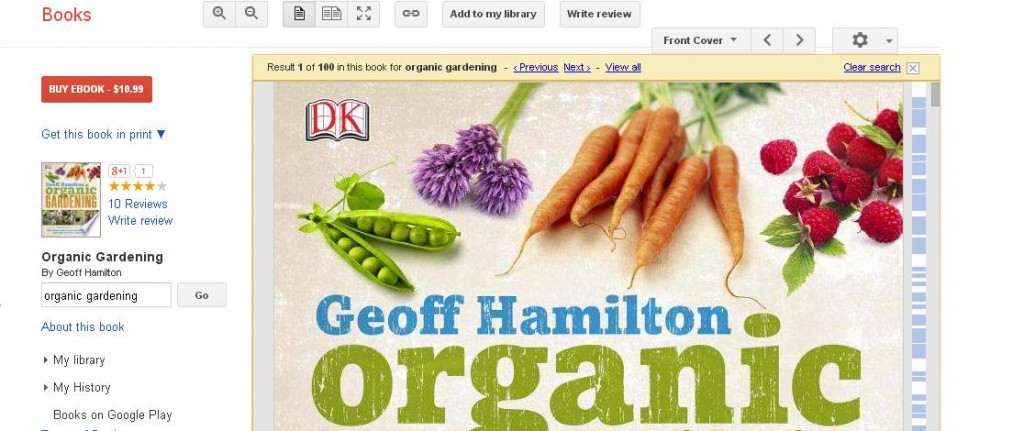
Clicking the “Preview” button below a search snippet will take you to a book’s information page on the Google Books website. That produces a popup showing the book cover. X that out and you’ll see the full information page that includes the book’s ISBN, year of publication, author and publisher, page count, format, and other metadata. Additionally, you’ll see a book description and an About the Author section. Scroll down and you can see where to buy the book and search for libraries that carry it. This is all great information that helps readers find books in which they may be interested, but this also includes benefits for authors.
On a book’s information page, right beside the “Preview” button, you’ll see another button labeled “Search inside.” Click that button and a popup panel appears showing the book’s cover. You can scroll through to see the Title page, Copyright page, and a partially clickable Table of Contents. This allows readers to preview much of the book’s contents. Again, there are massive benefits to this for authors.
In 2022, I wrote a book titled Cryptosocial: How Cryptocurrencies Are Changing Social Media. It was published by Business Expert Press. If you click the “Search inside” button, you’ll see that six out of the book’s 10 chapters in the Table of Contents are clickable. Click the chapter link for Chapter 6 and you can read a fictionalized account of what Facebook would look like if it had launched with a cryptocurrency. This benefits me because if readers like what they see in the preview, they can click a purchase link right from Google and buy the book in several online bookstores where it is available in every format.
How Authors Can Use Google Books For SEO And Gain New Readers
Google Books has been around long enough that a lot of search professionals are already aware of the vertical search opportunities, but I wonder how many non-SEO professionals are aware. If you are an author in any niche, whether it be fiction, poetry, or nonfiction, then you should be aware of the opportunities for attracting new readers through search.
The truth is, writing books is not much different today than it ever has been. Your job as author is to write a book that is relevant to reader interests, informs and entertains, and meets reader expectations on every level.
Still, if you want to increase your chances that your book will end up in the search indexes and be found by searchers, you should give careful thought to a few of its internal elements. These are the elements you should consider. They do not appear in any order of importance or relevance.
- Book Title – This may seem obvious, but judging from the “artificial intelligence” search results page, it looks like a book’s title is a huge factor in whether a book is relevant to a search query. In a search for “building a website with artificial intelligence” (without the quotes), every single search result contains either “build a website,” or a variation of that phrase, or “artificial intelligence,” and some have both phrases.
- Chapter Titles – Think of chapter titles as similar to page titles on a website. The title of the book is equal to the name of the website. Your chapter titles serve the same purpose as titles on a web page. They alert readers (and Google) to the contents of that chapter. Just as you would include keywords in a website page title, you should also include keywords in your book chapter titles.
- Table of Contents – You might think a table of contents isn’t necessary. Think again. It serves as more than a useful organizational purpose where SEO is concerned. If your titles include one or more of the search terms that are a part of a user’s search query, then it stands a better chance at being included in search results.
- Section Titles – Section titles are like subheads on a web page. They serve as useful headers to show readers (and Google) what a particular section of a chapter is about. Organized correctly, your book will follow a tiered format where each chapter is a subcategory of information within the general topic of your book. Likewise, your sections within each chapter will be a narrower view of that particular topic. These section titles could end up being relevant to particular search queries related to your book topic. For that reason, you should consider using long tail keyword phrases for your book’s section titles.
- Bibliographic Information – This includes book title, author, editor, publisher, ISBN, length, and general subjects under which the book could be categorized. People do search for books by these pieces of information.
- Reviews – If you can influence your readers to review your book, these reviews could influence search results in the same ways that business reviews may influence search results at Google Local.
- Citations – One thing I found interesting was the inclusion of web pages that cite About pages of certain books in Google’s search index. It will be interesting to see how these influence search results in the future. I suspect they will have an influence. In fact, a Google patent issued in 2011 indicates that is likely true.
This is important information for independent and self-published authors. If you are serious about book publishing success, then you should make every effort to ensure your book can be found by the types of readers you want. Google Books provides such an opportunity.
The bottom line for authors is that you can write your book in a way that increases your chances of being indexed through Google Books, and doing so could help you find new readers over time.
Are you an business professional who would like to publish a book and gain the benefits of being an author? Learn more about publishing your book as authority content.